
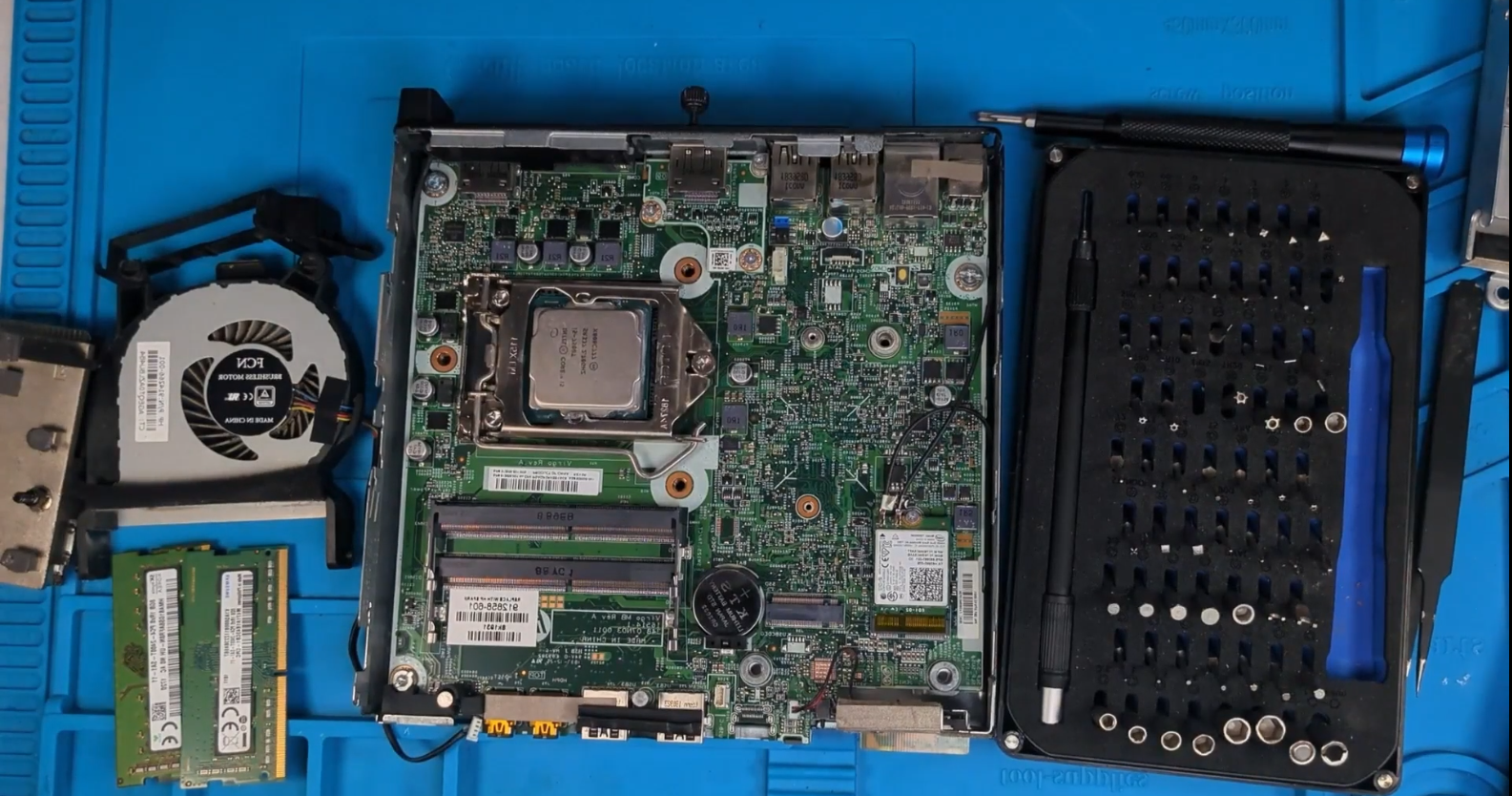
At Second Wind Sales, our mission is simple: keep high-quality hardware out of landfills and put it back to work. Today, we’re taking a deep dive into the HP ProDesk 400 G3 Mini.
While this machine might have started its life in a corporate office years ago, its Intel i5-7500T and tiny footprint make it the perfect candidate for a modern high-performance workstation or a snappy Linux media center.
Here is how we took this “dated” machine and made it faster than most budget PCs you’ll find on big-box store shelves today.
Affiliate Disclosure: Some of the links in this post are affiliate links, meaning, at no additional cost to you, Second Wind Sales may earn a commission if you click through and make a purchase.
1. The Hardware: Small Form Factor, Big Potential
The G3 Mini is a “1-liter” PC, but don’t let the size fool you. It offers impressive modularity for its class.
The Specs for our Build:
- CPU: Intel Core i5-7500T (4 Cores/4 Threads)
- RAM: 16GB DDR4 (The “sweet spot” for modern multitasking)
- Storage: Dual-drive capability (M.2 NVMe + 2.5″ SATA)
Step 1: The Deep Clean & Thermal Refresh
Before we touch the software, we have to address the “office dust.” Over time, thermal paste dries out, causing the CPU to throttle. We opened the chassis, blew out the cooling fins, and applied a fresh layer of high-quality thermal paste. This ensures the i5-7500T stays cool and quiet under load.
Step 2: The Storage Upgrade
To give this unit its “Second Wind,” we ditched the mechanical drives.
- Boot Drive: A new 256GB M.2 SSD for the OS (Fedora 43).
- Storage Drive: A massive 1TB 2.5″ SATA SSD mounted as the
/homedirectory.
2. Software: Entering the World of Fedora 43
We chose Fedora 43 for this build. It’s cutting-edge, secure, and incredibly efficient with system resources.
The “Speed Hack” for Faster Updates on your HP ProDesk 400 G3 Mini
Fedora is great, but the default download settings for updates are conservative. We tweaked the configuration to allow 10 simultaneous downloads, making system updates fly:
sudo nano /etc/dnf/dnf.conf# Add this line to the bottom: max_parallel_downloads=10Multimedia & Customization
To make this a true daily driver, we enabled the RPM Fusion repositories for full codec support and installed GNOME Tweaks for better UI control.
Bash
# Enable RPM Fusion & Swap to Full Codecs
sudo dnf install https://mirrors.rpmfusion.org/free/fedora/rpmfusion-free-release-$(rpm -E %fedora).noarch.rpm https://mirrors.rpmfusion.org/nonfree/fedora/rpmfusion-nonfree-release-$(rpm -E %fedora).noarch.rpm
sudo dnf swap ffmpeg-free ffmpeg --allowerasing
sudo dnf install gnome-tweaks
3. Performance Results: More than just Office Work
With 16GB of RAM and Fedora’s use of zRAM (on-the-fly memory compression), this machine handles 50+ browser tabs without breaking a sweat.
Can it game? Surprisingly, yes! By using GameMode, we can tell Fedora to prioritize CPU and GPU tasks for the game over background processes.
Pro-Tip: Install GameMode (sudo dnf install gamemode) and add GAMEMODE_PATH=/usr/bin/gamemode %command% to your Steam launch options.
Conclusion: Have an HP ProDesk 400 G3? Don’t Toss it, Upgrade it.
The HP ProDesk 400 G3 Mini is officially ready for another five years of service. It’s faster, more secure, and more capable than it was the day it left the factory.
Support the Mission: If you want to build your own, check out the links below for the tools we used:
- Thermal Paste: https://amzn.to/49w9Bc1
- 1TB Sata SSD: https://amzn.to/3YMKU4Y
- Air Duster: https://amzn.to/4sF5r94
- Alcohol Pump Dispenser: https://amzn.to/3Nv4yjm
- iFixit Mako Screwdriver Kit: https://amzn.to/4sF5r94
Frequently Asked Questions
Yes! Thanks to the Intel i5-7500T and the ability to upgrade to 16GB or 32GB of DDR4 RAM, the G3 Mini runs modern distributions like Fedora 43 and Ubuntu smoothly. It is an excellent choice for a power-efficient Linux workstation or home server.
Absolutely. The G3 Mini features one M.2 slot (supporting NVMe/PCIe) and one 2.5-inch SATA bay. Using a dual-drive setup—a fast M.2 for your OS and a high-capacity SATA SSD for storage—is the best way to maximize the performance of this machine.
While it is an older quad-core chip, the “T” series processors are designed for efficiency. For web browsing, office tasks, 4K video playback, and even light gaming via Steam (with GameMode enabled), the i5-7500T remains a highly capable and reliable CPU.
By default, Fedora downloads updates one at a time. You can significantly speed this up by modifying your dnf.conf file to allow for parallel downloads. Adding max_parallel_downloads=10 allows the system to pull multiple packages at once, cutting down update times by more than half.
Have old hardware lying around? Don’t let it go to waste. Give it a Second Wind.
Leave a Reply